Amazon KINDLE - 1ST GENERATION User's Guide Page 13
- Page / 36
- Table of contents
- TROUBLESHOOTING
- BOOKMARKS

- INTRODUCTION 01 4
- TOUR OF YOUR KINDLE 03 4
- KINDLE ACCESSORIES 10 4
- A WORD ABOUT WIRELESS 17 4
- MAINTAINING YOUR KINDLE 19 4
- TIPS AND TROUBLESHOOTING 23 5
- NOTICES AND CERTIFICATIONS 28 5
- PRODUCT SPECIFICATIONS 30 5
- Introduction 6
- Front View of Kindle 8
- Tour of Your Kindle 10
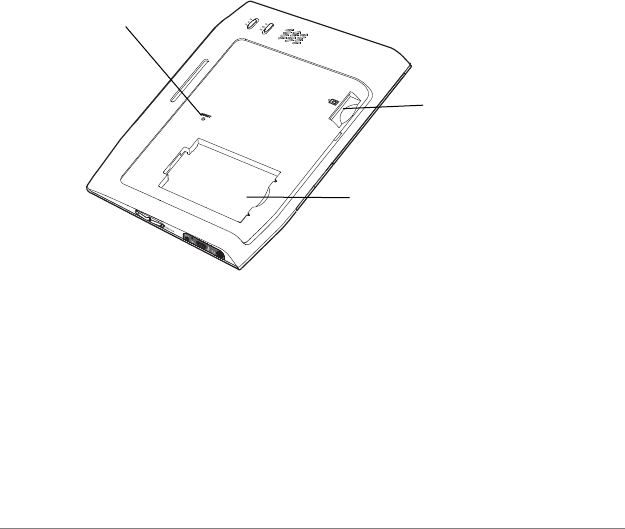
- Bottom View of Kindle 11
- SD memory card slot 13
- Battery compartment 13
- Reset button 13
- Kindle Accessories 15
- Connecting to Your Computer 19
- Using an SD Memory Card 21
- A Word About Wireless 22
- Turn Off Wireless When Flying 23
- Watch for Signs 23
- Maintaining Your Kindle 24
- Changing the Battery 25
- Battery Safety 27
- Tips and Troubleshooting 28
- The Wireless Connection 29
- Resetting Your Kindle 29
- Security Concerns 29
- The USB Connection 31
- No Sound 31
- Notices and Certifications 33
- UL Certification Number 34
- Product Specifications 35
- P/N - 220-1000-00 revC 36
Related products and manuals for Tablets Amazon KINDLE - 1ST GENERATION
 (74 pages)
(90 pages)
(14 pages)
(74 pages)
(90 pages)
(14 pages)
© 2020, manymanuals.com. All rights reserved. | 0.050 s |
 Manymanuals.com
 Manymanuals.de
 Manymanuals.fr
 Manymanuals.it
 Manymanuals.pl
 Manymanuals.cz
 Manymanuals.es
 Manymanuals-pt.com
Comments to this Manuals