2010 © Bits From Bytes. All rights reserved. Page 19
sales@bitsfrombytes.com +44 (0)1275 873792 Document No D100246
BFB 3000 Operations manual
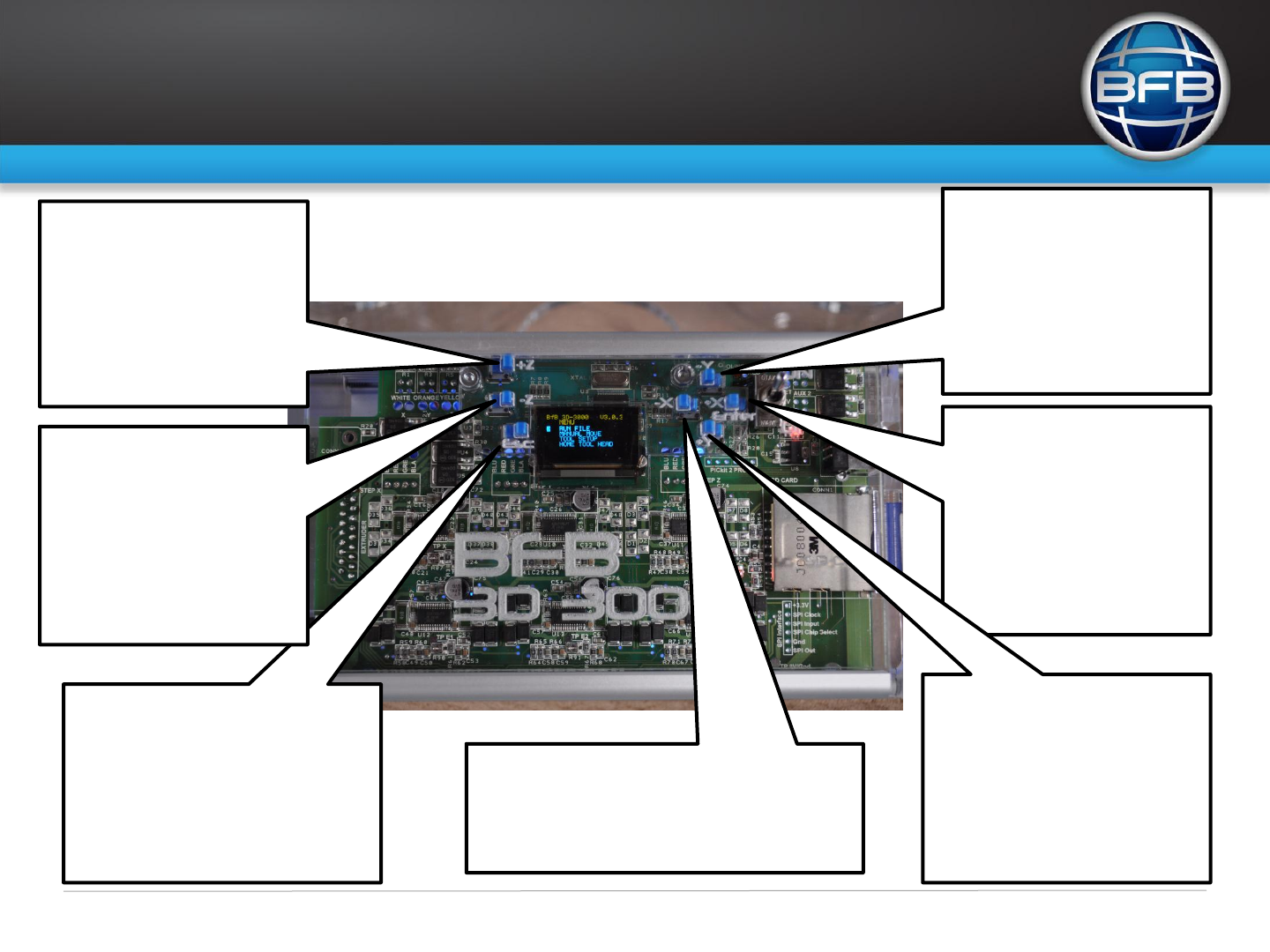
- Y:
Menu mode – Scroll button to move up
the menu & move up the selected files.
Manual move mode - Moves the Y axis
in a negative direction (to the back).
Tool setup mode – Increases the
extruder temperature.
Printing mode - Increases the extruder
temperature.
Home tool head – No function
Ent/+ X:
Menu mode - Enter button used to
select the highlighted item on the menu &
select file to run.
Manual move mode - Moves the X axis
in a positive direction (to the right).
Tool setup mode – Increases the
extruder flow rate.
Printing mode - Increases the extruder
flow rate.
Home tool head – No function
+ Y:
Menu mode – Scroll button to move down
the menu & move down the selected files.
Manual move mode - Moves the Y axis in a
positive direction (to the front).
Tool setup mode – Decreases the extruder
temperature.
Printing mode - Decreases the extruder
temperature.
Home tool head – No function
- X:
Menu mode – No function.
Manual move mode - Moves the X axis in a negative direction
(to the left).
Tool setup mode – Decreases the extruder flow rate.
Printing mode - Decreases the extruder flow rate. Home tool
head – No function
Esc:
Menu mode – No function
Manual move mode – Return to main menu.
Tool setup mode – Return to main menu.
Printing mode – Pause the print and send the
head to the rest position, 2
nd
press resumes
printing.
Home tool head – No function
- Z :
Menu mode – No function.
Manual move mode - Move sthe Z axis
in a negative direction (up) see section -
co-ordinate system
Tool setup mode – 3
rd
extruder head
temperature setting when pressed and
held with Y+ or Y-.
Printing mode - Increases the head
move speed (feed rate).
Home tool head – No function
+ Z:
Menu mode – No function.
Manual move mode - Moves the Z axis
in a positive direction (down) see section
- co-ordinate system
Tool setup mode – 2
nd
extruder head
temperature setting when pressed and
held with Y+ or Y-.
Printing mode - Decreases the head
move speed (feed rate).
Home tool head – No function
Control interface - overview

 (7 pages)
 Manymanuals.com
 Manymanuals.de
 Manymanuals.fr
 Manymanuals.it
 Manymanuals.pl
 Manymanuals.cz
 Manymanuals.es
 Manymanuals-pt.com
Comments to this Manuals